抖音微信聊天搞笑视频制作神器,新增生成视频功能
目前是一个半成品,先放一个演示图给大家看下效果吧(支持选择各种手机型号,增加暗夜模式、一键截图、一键生成视频等功能)

[content_hide]源码地址/持续更新地址:https://gitee.com/lifeixue/weixin-chat[/content_hide]
目前是一个半成品,先放一个演示图给大家看下效果吧(支持选择各种手机型号,增加暗夜模式、一键截图、一键生成视频等功能)
[content_hide]源码地址/持续更新地址:https://gitee.com/lifeixue/weixin-chat[/content_hide]
最新微软语音合成网页版源码,影视解说配音网页版,
仅几个文件写成的微软语音合成接口,调用的是官方api,亲测合成很快,
大家总听到的短视频电影解说与搞笑短视频,都是微软配音员,可以说是市面上语音合成中最像真人的了。
[content_hide]https://xiaok.lanzoum.com/imYFm0k6pzuh[/content_hide]

过WP后台➡插件➡安装插件➡上传插件,添加上传插件,启用后回跳转到插件设置页面(或者WP后台➡设置➡节点装点),可以选择显示顶部左右灯笼,花瓣飘落,梅花枝等.\

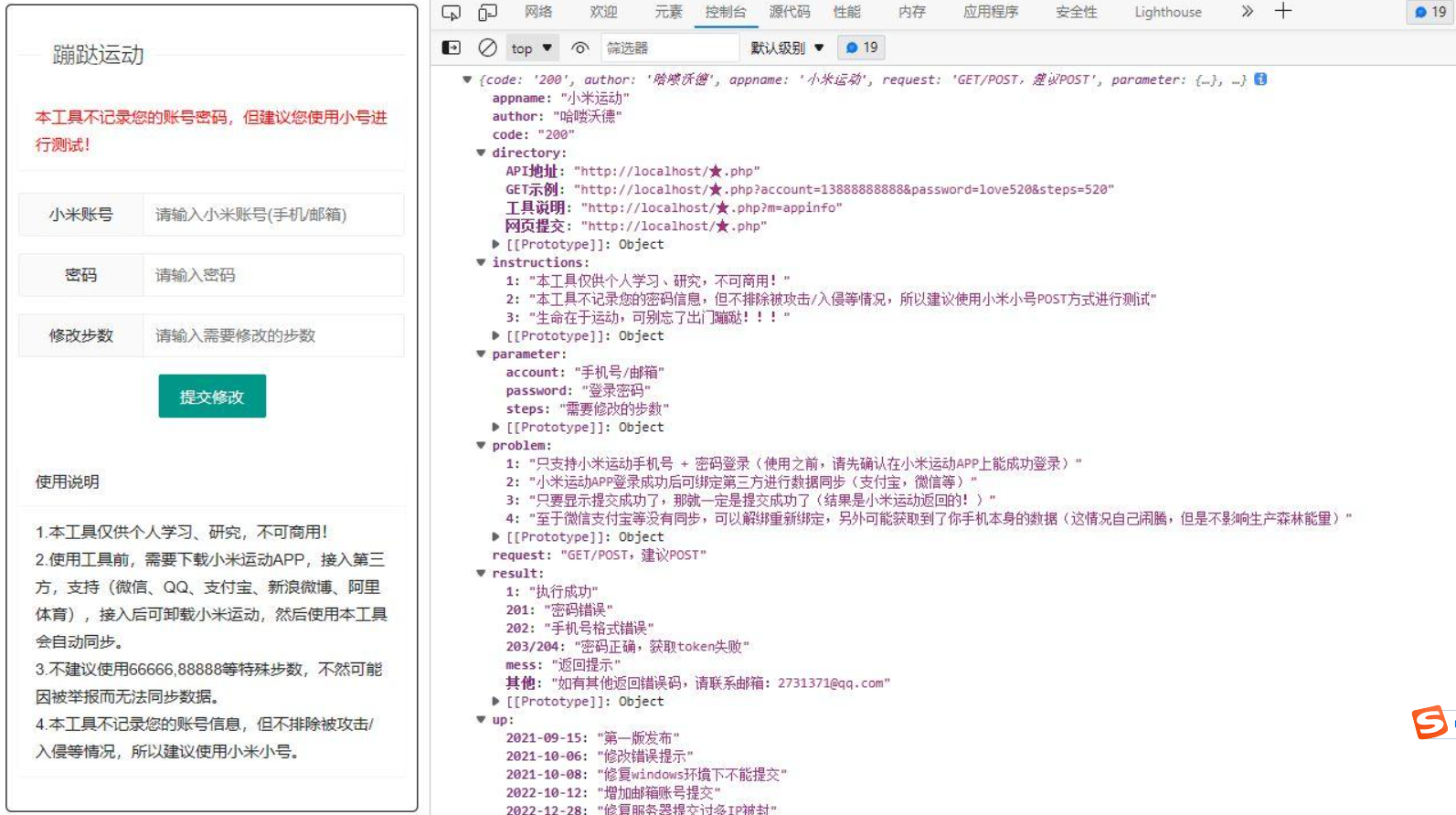
小米运动网页提交/API接口,单文件上传即用,文件名可随意修改,汉字符号均可,如图!
上传到服务器/虚拟主机,直接打开url地址即可使用,审查元素>>控制台/console>>刷新网页即可看到

直接到网站根目录创建一个css文件(文件名:sige.css),文件名可自定义(注意文件名一致)
<link rel="stylesheet" href="你的网站/sige.css" type="text/css" >
然后在header.php模板最上方添加引入代码
也可自定义HTML里添加css代码最上方写入标签<style></style>,将css代码放入标签内即可!
css代码如下:
.hide_sm{display: flex;}

.container .col-1-4{float: left;box-sizing: border-box;margin-right: 7.3333px;width: 100%;}

.container .col-1-4:last-child{margin-right: 0;}

@media (min-width:768px){.container .col-1-4{width: 50%}}

@media (min-width:1024px){.container .col-1-4{width: 25%}}

@media (min-width:1024px){.ripro-dark .home-first{background: #232425;}}

@media (min-width:768px){.home-first .h-images:after{display: none}}

@media (min-width:768px){.home-first .h-images{display: box;display: -ms-flexbox;display: flex;width: 100%;justify-content: space-between}}

@media (min-width:1024px){.home-first .h-images{width: 25%}}

.home-first .h-images .item-tuwen{float: left;padding: 0 6.5px;width: 50%}

@media (min-width:1024px){.home-first .h-images .item-tuwen{float: none}}

@media (min-width:1024px){.home-first .h-images{display: block;box-sizing: border-box;padding: 0 7.3333px}.home-first .h-images .item-tuwen{padding: 0;width: auto}}

.home-first .item-tuwen{margin-bottom: 15px}

@media (min-width:768px){.home-first .item-tuwen{margin-bottom: 13px}}

.home-first .item-tuwen a{position: relative;display: block;overflow: hidden;border-radius: 3px}

.home-first .item-tuwen a .thumb{padding-top: 57%;transition: all .2s;transform-origin: center}

.home-first .item-tuwen a strong{position: absolute;right: 0;bottom: 0;left: 0;z-index: 10;display: block;padding: .4em .8em .6em;background-image: linear-gradient(to bottom,rgba(0,0,0,.2) 0,rgba(0,0,0,.6) 100%);background-repeat: repeat-x;box-shadow: 0 -7px 15px rgba(0,0,0,.2);color: #fff;letter-spacing: .5px;font-weight: 700;font-size: 9pt;line-height: 1.3}

@media (min-width:768px){.home-first .item-tuwen a strong{letter-spacing: 1px;font-size: 14px;line-height: 1.4}}

.home-first .hf-widget{box-sizing: border-box;padding: 14px 17px 0;background: #17161600;box-shadow: 0 34px 20px -24px rgba(220, 220, 220, 0.18);border-radius: 3px;}

.ripro-dark .home-first .hf-widget{border: 1px solid #2b2b2b;background: #232425;box-shadow: 8px 8px 9pt #212121;}

@media (min-width:768px){.home-first .hf-widget{overflow: hidden;height: 135px}}

@media (min-width:1024px){.home-first .hf-widget{margin-bottom: 0}}

.home-first .hf-widget [class*=" icon-"]:before,.home-first .hf-widget [class^=icon-]:before{margin: 0}

.home-first .hf-widget .hf-widget-title{margin-bottom: 14px;padding: 0 0 10px;border-bottom: 1px solid #f2f2f2;color: #383838;letter-spacing: 1px;font-weight: 700;font-size: 15px;line-height: 20px;margin-bottom: 10px;}

.ripro-dark .home-first .hf-widget .hf-widget-title{border-bottom: 1px solid #696969;}

.ripro-dark .home-first .hf-widget .hf-widget-title a{color: #ccc;}

.home-first .hf-widget .hf-widget-title>i{margin-right: 2px;color: #448aff;}

.ripro-dark .home-first .hf-widget .hf-widget-title>i{margin-right: 2px;color: #ffa363}

.home-first .hf-widget .hf-widget-title span{margin-left: 10px;color: #a7a7a7;font-weight: 400;font-size: 9pt;line-height: 20px}

@media (min-width:1024px){.home-first .hf-widget .hf-widget-title span{display: none}}

@media (min-width:1330px){.home-first .hf-widget .hf-widget-title span{display: inline}}

.home-first .hf-widget .hf-widget-title .pages{float: right;padding-top: 2px}

.home-first .hf-widget .hf-widget-title .pages .next,.home-first .hf-widget .hf-widget-title .pages .prev{float: left;margin: 0;padding: 0 2px;height: 1pc;border: 1px solid #eee;color: #ccc;font-size: 9px;line-height: 15px;cursor: pointer}

.home-first .hf-widget .hf-widget-title .pages .next:hover,.home-first .hf-widget .hf-widget-title .pages .prev:hover{color: #448aff}

.home-first .hf-widget .hf-widget-title .pages .prev{border-right: none}

.home-first .hf-widget .hf-tags{margin-bottom: -10px}

@media (min-width:768px){.home-first .hf-widget .hf-tags{overflow: hidden;height: 4pc}}

.home-first .hf-widget .hf-tags a{display: inline-block;margin: 0 5px 10px;padding: 0 5px;height: 22px;border-radius: 2px;background: #f9f9f9;color: #888;white-space: nowrap;font-size: 9pt;line-height: 22px;word-break: break-all}

.home-first .hf-widget .hf-tags a.style_orange,.home-first .hf-widget .hf-tags a:hover{background: #448aff;color: #fff;}

.ripro-dark .home-first .hf-widget .hf-tags a{background: #2c2e2f;}

.home-first .hf-widget-4 .hf-widget-content{color: #888;font-size: 14px}

.home-first .hf-widget-4 .hf-widget-content a{color: #888}

.home-first .hf-widget-4 .hf-widget-content a:hover{color: #448aff;}

.home-first .hf-widget-4 .hf-widget-content h3{overflow: hidden;height: 22px;font-weight: 400;font-size: 13px;line-height: 22px;margin: 0 0 10px;}

.home-first .hf-widget-4 .hf-widget-content em{float: right;padding: 0 5px;height: 22px;border-radius: 2px;background: #fff5ef;color: #ff5c00;font-style: normal;font-size: 9pt;line-height: 22px}

.home-first .hf-widget-4 .hf-widget-content ul li{margin-bottom: 5px}

.home-first .hf-widget-4 .hf-widget-content ul li:last-child{margin-bottom: 0}

.home-first .hf-widget-1 .hf-widget-content a{color: #888}

.ripro-dark .home-first .hf-widget-1 .hf-widget-content a{color: #ccc}

.home-first .hf-widget-1 .hf-widget-content a:hover{color: #69a1ff;}

.home-first .hf-widget-1 .hf-widget-content li{float: left;box-sizing: border-box;padding: 0 10px;width: 25%;text-align: center;font-size: 9pt}

.home-first .hf-widget-1 .hf-widget-content li .thumb{margin: 0 auto 4px;padding-top: 36px;width: 36px}

.home-first .hf-widget-1 .hf-widget-content li span{display: block; height: 16px; line-height: 16px; overflow: hidden;}

.home-first .hf-widget-1 .hf-widget-content .scroll-h{margin: 0 -10px;}

.home-first .scroll-h{position: relative;overflow: hidden;height: 56px;}

.home-first .scroll-h ul{list-style: none;position: absolute;top: 0;left: 0;width: 100%;transition: all .2s; margin:0;padding-left:0;}

.home-first .scroll-h ul:after,.home-first .scroll-h ul:before{clear: both;display: block;visibility: none;height: 0;content: "";line-height: 0}

.home-first .scroll-h .holdon{position: absolute;top: 0;left: 100%}

.home-first .scroll-h .holdon-prev{left: -100%}

.home-first .hf-widget-hot-cats .hhicon{display: inline-block;margin-bottom: 5px;width: 36px;height: 36px;border-radius: 100%;background: #e8fbff;color: #448aff;text-align: center;font-size: 20px;line-height: 36px;}

.ripro-dark .home-first .hf-widget-hot-cats .hhicon{background: #2c2e2f;color: #ffa363;}

.home-first .hf-widget-hot-cats .scroll-h li a{display: block}

.home-first .hf-widget-hot-cats .scroll-h li a:hover .hhicon{background: #448aff;color: #fff;}

.home-first .thumb{position: relative;display: block;overflow: hidden;padding-top: 66.7%;width: 100%;height: 0;background-color: transparent;background-position: center;background-size: cover;background-repeat: no-repeat;transition: all .2s}

.home-first i{font-weight: 300}

@media screen and (max-width:720px){.home-first .hf-widget-1 .hf-widget-content .scroll-h,.home-first .hf-widget-content{margin: 1pc -10px}}

@media (max-width: 768px){.sxweb {display:none;}}

.icon-b i{

display: inline-block;

margin-bottom: 5px;

width: 36px;

height: 36px;

border-radius: 100%;

background: #e8fbff;

color: #448aff;

text-align: center;

font-size: 20px;

line-height: 36px;

}

.icon-b i:hover{

background: #448aff;

color: #fff;

}
外观-小工具-自定义HTML添加如下代码
<div class="section">

<div class="home-first">

<div class="container hide_sm">

<div class="col-1-4">

<div class="hf-widget hf-widget-1 hf-widget-software">

<h3 class="hf-widget-title">

<i class="fa fa-cloud"></i>

<a href="#" target="_blank">推荐产品</a>

<span>云服务器等云产品推荐</span>

</h3>

<div class="hf-widget-content">

<div class="scroll-h">

<ul>

<li>

<a href="#" rel="external nofollow" target="_blank">

<i class="thumb " style="background-image:url(https://ae01.alicdn.com/kf/H026cdceabc1942e1b82b1eb2cd5b9e41P.png)"></i>

<span>阿里云</span></a>

</li>

<li>

<a href="#" target="_blank">

<i class="thumb " style="background-image:url(https://ae01.alicdn.com/kf/H006240f97bff40f5aea223eb51b33c3dq.png)"></i>

<span>腾讯云</span></a>

</li>

<li>

<a href="#" target="_blank">

<i class="thumb " style="background-image:url(https://ae01.alicdn.com/kf/H2da200a36ce2401595f8e03f8c750deeT.png)"></i>

<span>企业云</span></a>

</li>

<li>

<a href="#" target="_blank">

<i class="thumb " style="background-image:url(https://ae01.alicdn.com/kf/H128bb4d1c77d4f6f9032b934a6a234beD.png)"></i>

<span>香港云</span></a>

</li>

</ul>

</div>

</div>

</div>

</div>

<div class="col-1-4 sxweb">

<div class="hf-widget hf-widget-2">

<h3 class="hf-widget-title">

<i class="fa fa-tint"></i>

<a href="#" target="_blank">热门看点</a>

<span>精品内容推荐</span></h3>

<div class="hf-widget-content">

<div class="no-scroll hf-tags">

<a class="style_orange" href="http://www.lxh5068.com" target="_blank">

<span>手机壁纸</span></a>

<a class="" href="/topics/jc-fx" target="_blank">

<span>教程分享</span></a>

<a class="" href="/topics/wz-ym" target="_blank">

<span>源码分享</span></a>

<a class="" href="/topics/rj-android" target="_blank">

<span>Android软件</span></a>

<a class="" href="/topics/xw-zx" target="_blank">

<span>新闻资讯</span></a>

<a class="" href="/xb-zh" target="_blank">

<span>线报活动</span></a>

<a class="" href="/topics/meihua" target="_blank">

<span>美化代码</span></a>

</div>

</div>

</div>

</div>

<div class="col-1-4 sxweb">

<div class="hf-widget hf-widget-1 hf-widget-hot-cats">

<h3 class="hf-widget-title">

<i class="fa fa-dropbox"></i>

<a href="http://bbs.lxh5068.com/sort/huodong" target="_blank">热门专区</a>

<span>推荐设计热点</span></h3>

<div class="hf-widget-content">

<div class="icon-b">

<ul>

<li>

<a href="http://bbs.lxh5068.com/sort/zhide" target="_blank">

<i class="fa fa-thumbs-up" aria-hidden="true"></i>

<span>每日推荐</span></a>

</li>

<li>

<a href="http://bbs.lxh5068.com/sort/mianfeirj" target="_blank">

<i class="fa fa-cloud-download" aria-hidden="true"></i>

<span>软件下载</span></a>

</li>

<li>

<a href="http://bbs.lxh5068.com/sort/yuanma" target="_blank">

<i class="fa fa-graduation-cap"></i>

<span>源码教程</span></a>

</li>

<li>

<a href="http://bbs.lxh5068.com/sort/guanzhu" target="_blank">

<i class="fa fa-picture-o" aria-hidden="true"></i>

<span>福利美图</span></a>

</li>

</ul>

</div>

</div>

</div>

</div>

<div class="col-1-4 sxweb">

<div class="hf-widget hf-widget-4">

<h3 class="hf-widget-title">

<i class="fa fa-book"></i>

<a href="#" target="_blank">最新活动</a>

<span>免费会员享福利</span>

</h3>

<div class="hf-widget-content">

<div class="scroll-h">

<ul>

<li>

<h3>

<a href="#" target="_blank">

<i class="icon-time"></i>

<span>美化服务火热售卖中</span>

<em>网站美化</em></a>

</h3>

</li>

<li>

<h3>

<a href="#" target="_blank">

<i class="icon-time"></i>

<span>关于本站学分付费阅读获取内容说明</span>

<em>学分说明</em></a>

</h3>

</li>

</ul>

</div>

</div>

</div>

</div>

</div>

</div>

</div>

先运行模板目录下文件初始化 域名/content/templates/weike/update.php
然后首页下面会有一个小分区报错
只需在模板设置的人气排行右侧专区那里填个分类id即可
模板不依赖模板设置插件
系统设计理念说明
详细安装、配置教程
https://www.bilibili.com/video/BV1TD4y1Y7CV?share_source=copy_web
二、核心功能说明
系统一共有三个使用角色,相当于有三套系统,在这里只介绍核心的一些功能及实现。
导入学生名单或者成绩名单
 复制代码 隐藏代码
public class ReadStudentXlsFiles {
    private static String basePath = "G:\\Projects\\Materials\\cqes4cs\\files\\students\\";
    public static List<HashMap<String, Object>> readStudentXlsx(String fileFinalName) throws FileNotFoundException {
        // 将文件存入本地,便于读取
        String filePath = basePath + fileFinalName;
        File file = new File(filePath);
        FileInputStream fs = new FileInputStream(file);
        List<HashMap<String, Object>> lst = new ArrayList<>();
        try {
            String fileName = file.getName();
            String[] fileParts = fileName.split("\\.");
            Workbook sheets;
            if (fileParts[fileParts.length - 1].equals("xls")) {
                sheets = new HSSFWorkbook(fs);
            } else {
                sheets = new XSSFWorkbook(fs);
            }
            Sheet sheet = sheets.getSheetAt(0);
            int rowCount = sheet.getLastRowNum();
            int colNum = sheet.getRow(0).getPhysicalNumberOfCells();
            // 遍历行
            for (int i=1; i<=rowCount; i++) {
                HashMap<String, Object> map = new HashMap<>();
                Row row = sheet.getRow(i);
                // 遍历列
                for(int j = 0; j < colNum; j++){
                    if(row.getCell(j) != null){
                        row.getCell(j).setCellType(CellType.STRING);
                        String cellValue = row.getCell(j).getStringCellValue();
                        switch (j) {
                            case 0:
                                map.put("userid", cellValue);
                                break;
                            case 1:
                                map.put("name", cellValue);
                                break;
                            case 2:
                                map.put("major_code", cellValue);
                                break;
                            case 3:
                                map.put("class", cellValue);
                                break;
                            case 4:
                                map.put("year", cellValue);
                                break;
                            default: break;
                        }
                    }
                }
                lst.add(map);
            }
            fs.close();
            return lst;
        } catch (Exception e) {
            e.printStackTrace();
        }
        return null;
    }
}
处理加分规则配置
// notation

@RequestMapping("/modifyContestConfig")

@Transactional

@RequiresRoles("manager")

public ResponseEntity modifyContestConfig(@RequestParam Map<String, String> map) {

                List<HashMap<String, Object>> list = new ArrayList<>();

                Map<String, String> nameMap = new HashMap<>();

                Map<String, String> indexMap = new HashMap<>();

                for (Map.Entry<String, String> entry : map.entrySet()) {

                                if (entry.getKey().equals("name")) {

                                                nameMap = JSON.parseObject(entry.getValue(), HashMap.class);

                                }

                                if (entry.getKey().equals("index")) {

                                                indexMap = JSON.parseObject(entry.getValue(), HashMap.class);

                                }

                }


                // 清空配置表

                if (nameMap.size() == 0 || indexMap.size() == 0) {

                                basicInfoMapper.deleteContestConfig();

                                return ResponseEntity.ok().body(ResultVOUtil.successSimple());

                }

                // 组装list

                for (Map.Entry<String, String> entry : map.entrySet()) {

                                if (entry.getKey().equals("name")) break;

                                if (entry.getKey().equals("index")) break;

                                HashMap<String, Object> mapp = new HashMap<>();

                                mapp.put("uuid", entry.getKey());

                                mapp.put("config", entry.getValue());

                                mapp.put("name", nameMap.get(entry.getKey()));

                                mapp.put("indexid", indexMap.get(entry.getKey()));

                                list.add(mapp);

                }

                Boolean flag = false;

                try {

                                // 先存入临时表

                                basicInfoMapper.updateContestConfigTemp(list);

                                // 再删除原始表里面的所有数据

                                basicInfoMapper.deleteAllContestConfig();

                                // 最后将临时表的数据复制到原始表中

                                basicInfoMapper.updateContestConfig();

                                // 最后删除临时的规则表,方便下一次的数据存储

                                basicInfoMapper.deleteContestsConfigTemp();

                } catch (Exception e) {

                                flag = true;

                                throw new RuntimeException("New Error");

                }

                if (flag) return ResponseEntity.ok().body(ResultVOUtil.error(1, "操作失败,请联系管理员"));

                return ResponseEntity.ok().body(ResultVOUtil.successSimple());

}
|
编辑加分规则:
setroot(node, data) {

        // 取消设置为叶子节点

        if (data.tag == 'root') {

                let parent = node.parent

                let newChild = { uuid: data.uuid, name: data.name, children: [] }

                let children = parent.data.children || parent.data

                let index = children.findIndex(d => d.uuid === data.uuid)

                children.splice(index, 1)

                if (!parent.data.children) {

                        this.$set(parent.data, 'children', [])

                }

                parent.data.children.push(newChild)

                return

        }

        // 设置叶子节点

        if (data.children.length > 0) return this.$msg.error("存在下一级的时候不能设置为叶子节点")

        let temp = {

                uuid: data.uuid,

                name: data.name,

                tag: 'root',

                score: 0

        }

        this.$prompt('请为叶子节点设置分值,最多保留两位小数', '提示', {

                confirmButtonText: '确定',

                cancelButtonText: '取消'

        }).then(({ value }) => {

                if (isNaN(value) || value.trim().length == 0) return this.$msg.error("请输入正确的数值")

                temp.score = value

                let parent = node.parent

                let children = parent.data.children || parent.data

                let index = children.findIndex(d => d.uuid === data.uuid)

                children.splice(index, 1)

                parent.data.children.push(temp)

        }).catch(()=>{return this.$msg.error("输入加分分值才能设置为叶子节点")})

}
|
// 选择某个比赛后搜索比赛的相关配置

async handleSelect(item) {

        let {data: res} = await this.$http.post('/getContestConfigById', this.$qs.stringify({id: item.id}))

        if (!res) return

        if (res.code != 0) return this.$msg.error(res.message)

        this.curLevelConfig = JSON.parse('[' + res.data.classconfig + ']')

        this.stepForm.ruleid = res.data.uuid

        this.stepForm.name = res.data.name

        this.toNext()

},
|
三、系统界面一览


学分评价结果总览:

学分评价整体结果:

处理学分申请异议:

管理常见专业赛事配置:

学生信息&学分管理:

加分规则配置:

学生综合素质可视化分析:

项目下载
后端搭建
数据导入

Redis和数据库
静态资源映射

系统使用入门
【重要说明】
价值1000元全新的UI,新版和老版本的UI都在压缩包里面了。
这个是专业版的,而且题库贼鸡儿全,百分之99的题都能搜到的。
运营版学法减分小程序源码,后台基于thinkphp的微信小程序源码。
程序开源无病毒,放心研究学习内置的算法和框架架构!!!!
php5.6+Mysql(环境配置为锦尚中国版主调试时的配置 请严格按照配置环境要求运行)
经过电脑管家、网站安全狗扫描特征码,没有发现可疑文件,请放心使用!


