7b2教程-添加横幅广告条
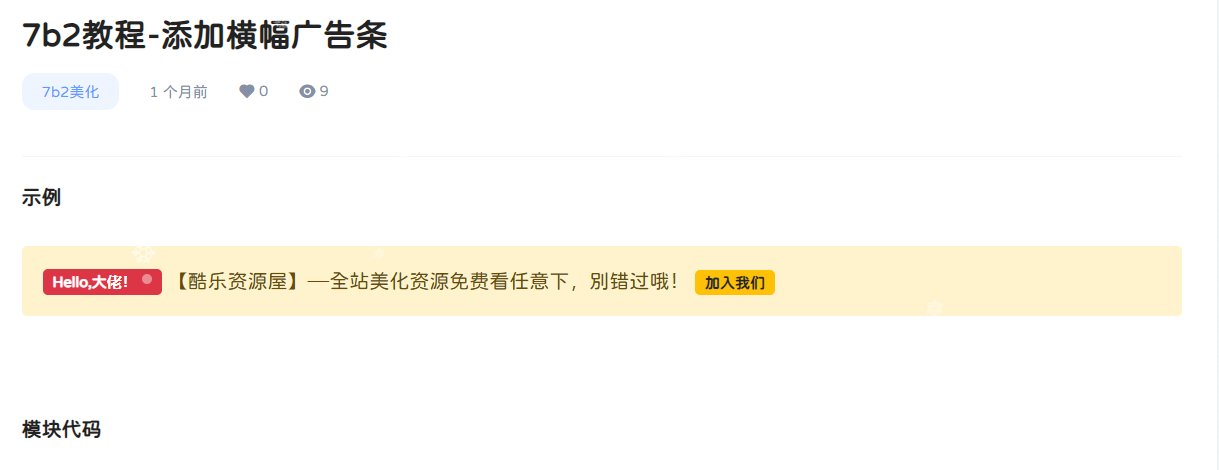
模块代码
<div class="alert alert-warning alert-dismissible fade show" role="alert">

	<strong>

		<span class="badge bg-danger">

			Hello,大佬!<sup aria-hidden="true" class="spinner-grow spinner-grow-sm ml-1 small" role="status" style=" width: .5rem; height: .5rem; "></sup>

		</span>

	</strong>

	<span>【酷乐资源屋】---全站美化资源免费看任意下,别错过哦!</span>

	<a class="badge bg-warning text-dark" href="/vips"

	   rel="nofollow noopener noreferrer" target="_blank">

		加入我们

	</a>

</div>
css样式
.alert-warning {

    color: #664d03;

    background-color: #fff3cd;

    border-color: #ffecb5;

}

.alert-dismissible {

    padding-right: 3rem;

}

.alert {

    position: relative;

    padding: 1rem 1rem;

    margin-bottom: 1rem;

    border: 1px solid transparent;

    border-radius: .25rem;

}

@media (prefers-reduced-motion: reduce){

.fade {

    transition: none;

}

}

.fade {

    transition: opacity .15s linear;

}

.bg-danger {

    background-color: #dc3545!important;

}.badge {

    display: inline-block;

    padding: .35em .65em;

    font-size: .75em;

    font-weight: 700;

    line-height: 1;

    color: #fff;

    text-align: center;

    white-space: nowrap;

    vertical-align: baseline;

    border-radius: .25rem;

}

.bg-warning {

    background-color: #ffc107!important;

}

.text-dark {

    color: #212529!important;

}.alert-dismissible .btn-close {

    position: absolute;

    top: 0;

    right: 0;

    z-index: 2;

    padding: 1.25rem 1rem;

}

.btn-close {

    box-sizing: content-box;

    width: 1em;

    height: 1em;

    padding: .25em .25em;

    color: #000;

    border: 0;

    border-radius: .25rem;

    opacity: .5;

}

@media (prefers-reduced-motion: reduce){

.spinner-border, .spinner-grow {

    -webkit-animation-duration: 1.5s;

    animation-duration: 1.5s;

}

}

.spinner-grow-sm {

    width: 1rem;

    height: 1rem;

}.spinner-grow {

    display: inline-block;

    width: 2rem;

    height: 2rem;

    vertical-align: -.125em;

    background-color: currentColor;

    border-radius: 50%;

    opacity: 0;

    -webkit-animation: .75s linear infinite spinner-grow;

    animation: .75s linear infinite spinner-grow;

}.small, small {

    font-size: .875em;

}

@keyframes spinner-grow {

0% {

    transform: scale(0);

  }

  50% {

    opacity: 1;

    transform: none;

  }

}

.btn-close:hover {

    color: #000;

    text-decoration: none;

    opacity: .75;

}

sup.spinner-grow.spinner-grow-sm.ml-1.small {

    margin-left: 4px;

    margin-bottom: 4px;

}