作者: gao19970828

  • 抖音短视频批量采集下载工具 电脑版

    一键保存该账号主页下的所有视频

    【抖音采集工具Gui版】

    ★软件下载解压后直接使用,免费无广、功能强大

    下面是软件的主界面,看上去有些简单?

    (其实一点不简单[大拇指])

    ★打开选项设置之后,可以更改的选项还是挺丰富的,动态封面和音频也可以下载哦。

    【抖音采集使用方法】

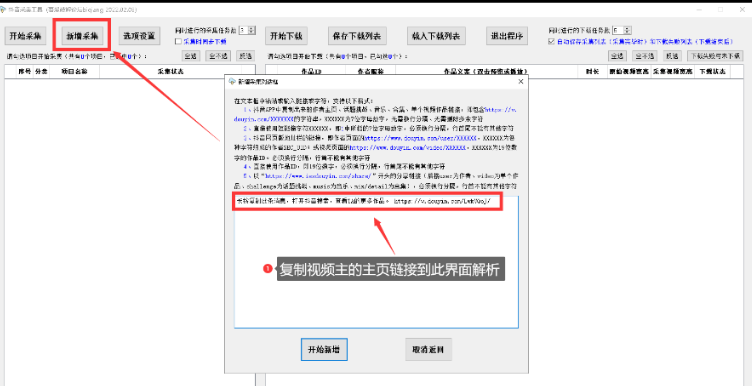
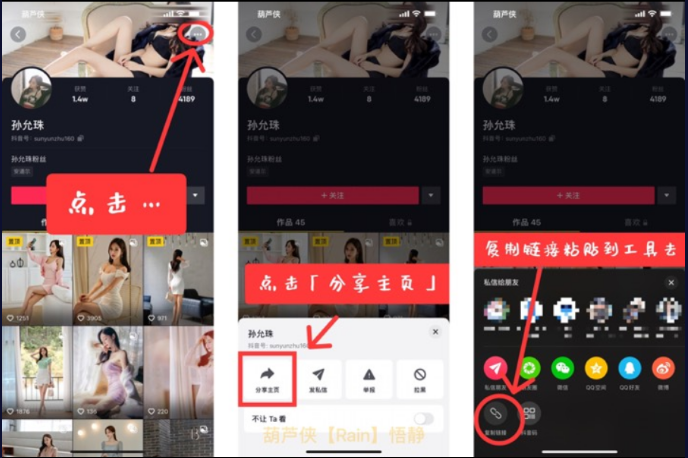
    ★打开{抖音}找到需要收集的视频主的账号界面,点击分享,把视频主的主页链接复制过来,粘贴到软件,点击新建采集,然后就能看到需要采集的具体视频信息:作者 ID,昵称,作品文案, 时长宽高清晰度等等,双击还可以播放,使用起来的步骤比较完善。

    抖音短视频批量采集下载工具 电脑版

    ● 可以采集某作者所有作品(含作者喜欢作品)、单个视频作品、某话题挑战下指定数量作品、使用某音乐的指定数量作品、某合集的指定数量作品。

    ● 主要是为了便于作品下载的管理进行了分别保存,同时检测作者、话题挑战、音乐、合集的作品的更新,有新作品时仅下载新作品。

    ● 可边采集边下载,也可采集完毕再选择下载,下载列表可有选择地保存为Excel,下次可直接导入再进行下载。

    ●就连作者喜欢的视频也可以关联下载,视频的话题挑战和合集这些也可以指定,时间范围也可以控制,还有下载进度保存,还能导出为 Excel 表格,确实考虑得很周到

    抖音短视频批量采集下载工具 电脑版

    之后就会出现在采集列表,可以同时添加多个不同的任务,点击采集之后就可以开始下载,下载速度也是非常嘎嘎快。

    嘎嘎滴一下子就把所有视频下载好了[滑稽]

    所以,软件上面的这个勾要记得去掉,需要的时候可以在再打开!

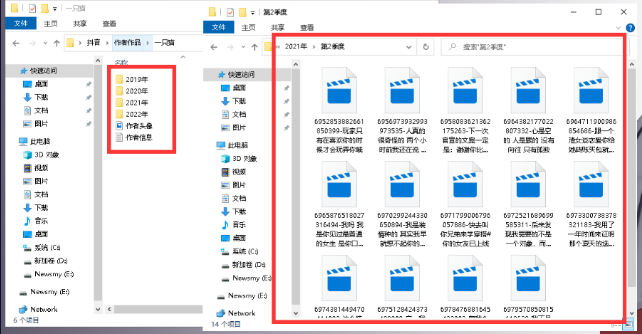
    下载之后的视频,这些文件夹的格式也让人极度舒适,方便寻找.

    不只有账号的头像和粉丝数量简介等信息,文件还按照视频的年份,季度,分类得整整齐齐。

    下载的文件名字也不是一堆奇怪的命名,附带上了视频作者上传时填写的信息。

    抖音短视频批量采集下载工具 电脑版抖音短视频批量采集下载工具 电脑版

  • 抖音短视频批量采集下载工具 电脑版

    一键保存该账号主页下的所有视频

    【抖音采集工具Gui版】

    ★软件下载解压后直接使用,免费无广、功能强大

    下面是软件的主界面,看上去有些简单?

    (其实一点不简单[大拇指])

    ★打开选项设置之后,可以更改的选项还是挺丰富的,动态封面和音频也可以下载哦。

    【抖音采集使用方法】

    ★打开{抖音}找到需要收集的视频主的账号界面,点击分享,把视频主的主页链接复制过来,粘贴到软件,点击新建采集,然后就能看到需要采集的具体视频信息:作者 ID,昵称,作品文案, 时长宽高清晰度等等,双击还可以播放,使用起来的步骤比较完善。

    抖音短视频批量采集下载工具 电脑版

    ● 可以采集某作者所有作品(含作者喜欢作品)、单个视频作品、某话题挑战下指定数量作品、使用某音乐的指定数量作品、某合集的指定数量作品。

    ● 主要是为了便于作品下载的管理进行了分别保存,同时检测作者、话题挑战、音乐、合集的作品的更新,有新作品时仅下载新作品。

    ● 可边采集边下载,也可采集完毕再选择下载,下载列表可有选择地保存为Excel,下次可直接导入再进行下载。

    ●就连作者喜欢的视频也可以关联下载,视频的话题挑战和合集这些也可以指定,时间范围也可以控制,还有下载进度保存,还能导出为 Excel 表格,确实考虑得很周到

    抖音短视频批量采集下载工具 电脑版

    之后就会出现在采集列表,可以同时添加多个不同的任务,点击采集之后就可以开始下载,下载速度也是非常嘎嘎快。

    嘎嘎滴一下子就把所有视频下载好了[滑稽]

    所以,软件上面的这个勾要记得去掉,需要的时候可以在再打开!

    下载之后的视频,这些文件夹的格式也让人极度舒适,方便寻找.

    不只有账号的头像和粉丝数量简介等信息,文件还按照视频的年份,季度,分类得整整齐齐。

    下载的文件名字也不是一堆奇怪的命名,附带上了视频作者上传时填写的信息。

    抖音短视频批量采集下载工具 电脑版抖音短视频批量采集下载工具 电脑版

  • 7b2友链申请表页面

    js不是wordpress通用,js仅用于7b2pro主题,因使用7b2js函数,其他主题可以更改Ajax,传输token。

    提交页面HTML代码:

    分类是自动获取网站的链接分类,可以改代码自定义设置。

    <?php
    get_header();
    $cats = get_terms('link_category');
    ?>
    <div id="vips">
        <div v-if="b2token" data-name="xutian" v-cloak>
            <div style="margin-top: 80px;margin-bottom:80px;display:flex;justify-content:center;" class="containers">
                <div class="content content-link-application">
                    <div class="form-header">
                        <h1>友链申请</h1>
                        <br />
                        <p>您可以通过提交下面的表单贵站相关信息。</p>
                    </div>
                    <div class="wb-form contact-form nice-validator n-default">
                        <div class="mt20">
                            <div class="form-group">
                                <label>
                                    <font color="red">*</font>站点名称:
                                </label>
                                <input type="text" size="40" v-model.trim="link_name" class="form-control" placeholder="输入您的网站名称" autocomplete="off" />
                            </div>
                            <div class="form-group">
                                <label>
                                    <font color="red">*</font>站点地址:
                                </label>
                                <input type="text" size="40" v-model.trim="link_url" class="form-control" placeholder="输入您的网站地址" autocomplete="off" />
                            </div>
                            <div class="form-group">
                                <label>站点简介:</label>
                                <input type="text" size="40" v-model.trim="link_description" class="form-control" placeholder="输入您的网站简介" autocomplete="off" />
                            </div>
                            <div class="form-group">
                                <label>站点Logo:</label>
                                <input type="text" size="40" v-model.trim="link_image" class="form-control" placeholder="请输入您的Logo链接地址" autocomplete="off" />
                            </div>
                            <div class="form-group">
                                <label>其他备注:</label>
                                <textarea class="check-textarea" style="min-height:200px;width:100%;padding:10px;" placeholder="输入备注" size="40" v-model.trim="link_notes"></textarea>
                            </div>
                            <div class="form-group">
                                <label>
                                    <font color="red">*</font>站点分类:
                                </label>
                                <br />
                                <select class="check-textarea" v-model.trim="link_category">
                                    <option value="">请选择链接分类</option>
                                    <?php
                                    foreach ($cats as $cat) {
                                        echo '<option value="' . $cat->term_id . '">' . $cat->name . '</option>';
                                    }
                                    ?>
                                </select>
                            </div>
                            <div style="text-align:center">
                                <input type="hidden" value="send" />
                                <button class="btn-primary" @click="showWindow()" v-cloak>提交</button>
                            </div>
                        </div>
                    </div>
                </div>
            </div>
        </div>
        <div v-else id="main" v-cloak>
            <div style="margin-top:80px;display:flex;justify-content:center;" class="containers">
                <div class="content content-link-application">
                    <div class="form-header">
                        <h1>友链申请</h1>
                        <br />
                        <p style="font-size:15px;">请登录后再试</p>
                        <br />
                        <div>
                            <button @click="login()">立即登录</button>
                        </div>
                    </div>
                </div>
            </div>
        </div>
    </div>
    </div>
    <?php
    get_footer();

    提交页面CSS代码:

    .content-link-application{
    	padding: 60px 40px;
    	background-color: #fff;
    	border-radius: 5px;
    	width: 800px;
    	-webkit-box-shadow: 0 7px 8px 0 rgba(0,0,0,.11);
    	box-shadow: 0 7px 8px 0 rgba(0,0,0,.11)
    }
    .content-link-application .form-control
    {
    	height: 38px;
    	width: 100%
    }
    .content-link-application .captcha-img,.content-link-application .captcha-input
    {
    	display: inline-block;
    	vertical-align: middle
    }
    .content-link-application .form-header
    {
    	max-width: 600px;
    	margin-left: auto;
    	margin-right: auto;
    	padding-bottom: 40px
    }
    .content-link-application .form-header p
    {
    	color: #999;
    	font-size: 12px;
    	margin: 0;
    }
    .content-link-application h1
    {
    	font-size: 30px;
    	line-height: 44px;
    	font-weight: 700
    }
     .content-link-application .form-control{height:38px;width:100%}
     .content-link-application .captcha-img,.content-link-application .captcha-input{display:inline-block;vertical-align:middle}
     .content-link-application .contact-form{max-width:600px;margin-left:auto;margin-right:auto}
     .content-link-application .form-header{max-width:600px;margin-left:auto;margin-right:auto;padding-bottom:40px;text-align:center}
     .content-link-application .form-header p{color:#999;font-size: 12px;margin: 0;}
     .content-link-application h1{font-size:30px;line-height:44px;font-weight:700}
     
     .form-group
    {
    	margin-bottom: 15px
    }
    .content-link-application .form-control
    {
    	height: 38px;
    	width: 100%
    }
    .btn.btn-default
    {
    	color: #333;
    	background-color: #fff;
    	border-color: #ccc;
    	outline: 0;
    	-webkit-transition: all .1s ease-out 0s;
    	-o-transition: all .1s ease-out 0s;
    	transition: all .1s ease-out 0s
    }
    .container,.page-no-sidebar.member-lostpassword .member-lp-process
    {
    	margin-right: auto;
    	margin-left: auto;
    	padding-left: 10px;
    	padding-right: 10px
    }

    提交页面JS代码:

    var xutianlinks = new Vue({
        el: '#vips',
        data: {
            link_name: '',
            link_url: '',
            link_description: '',
            link_category: '',
            link_image: '',
            link_notes: ''
        },
        methods: {
            login() {
                login.show = true
            },
            showWindow() {
                if (!b2token) {
                    Qmsg['warning']('请登录后提交', { html: true });
                } else {
                    if (this.link_name.length <= '0') {
                        Qmsg['warning']('请输入您的网站名称', { html: true });
                    } else if (this.link_url.length <= '0') {
                        Qmsg['warning']('请输入您的网站地址', { html: true });
                    } else if (this.link_category.length <= '0') {
                        Qmsg['warning']('请选择站点分类', { html: true });
                    } else {
                        this.$https.post(b2_rest_url + 'xutian_api_link', 'link_name=' + this.link_name + '&link_url=' + this.link_url + '&link_description=' + this.link_description + '&link_category=' + this.link_category + '&link_image=' + this.link_image + '&link_notes=' + this.link_notes).then(res => {
                            if (res.data.status == 200) {
                                Qmsg['success'](res.data.msg, { html: true });
                                location.reload();
                            } else if (res.data.status == 401) {
                                Qmsg['info'](res.data.msg, { html: true });
                            }
                        }).catch(err => {
                            Qmsg['info'](err.response.data.message, { html: true });
                        })
                    }
                }
            }
        },
    })

    后端处理PHP代码:

    请将下方代码放入functions.php文件中

    <?php
    add_action('rest_api_init', function () {
        register_rest_route('b2/v1', '/xutian_api_link/', array(
            'methods' => 'POST',
            'callback' => function ($request) {
                $user_id = get_current_user_id();
                $xutian_api_link = get_user_meta($user_id, 'xutian_api_link', true);
                if (!$user_id) {
                    return new \WP_Error('b2_login', __('请先登录', 'b2'), array('status' => 403));
                } else if ($xutian_api_link) {
                    return new \WP_Error('xutian_api_link', __('您已提交,请勿重复提交', 'b2'), array('status' => 403));
                } else if ($request['link_name'] && $request['link_url'] && $request['link_category']) {
                    return api_link($request, $user_id);
                } else {
                    return new \WP_Error('user_error', __('请输入必填项', 'b2'), array('status' => 403));
                }
            },
        ));
    });
    function api_link($request, $user_id)
    {
        $link_url = isset($request['link_url']) ? trim(sanitize_text_field(htmlspecialchars($request['link_url'], ENT_QUOTES))) : '';
        $link_name = isset($request['link_name']) ? trim(sanitize_text_field(htmlspecialchars($request['link_name'], ENT_QUOTES))) : '';
        $link_image = isset($request['link_image']) ? esc_url($request['link_image']) : '';
        $link_category = isset($request['link_category']) ? trim(sanitize_text_field(htmlspecialchars($request['link_category'], ENT_QUOTES))) : '';
        $link_description = isset($request['link_description']) ? trim(sanitize_text_field(htmlspecialchars($request['link_description'], ENT_QUOTES))) : '';
        $link_notes = isset($request['link_notes']) ? trim(sanitize_text_field(htmlspecialchars($request['link_notes'], ENT_QUOTES))) : '';
        if ($user_id and $link_name and $link_url and $link_category and $link_description = $link_name) {
            $linkdata = array(
                'link_name' => '【待审核】' . $link_name,
                'link_url' => $link_url,
                'link_image' => $link_image,
                'link_category' => $link_category,
                'link_notes' => $link_notes,
                'link_description' => $link_description,
                'link_target' => '_blank',
                'link_visible' => 'N'
            );
            require_once(ABSPATH . 'wp-admin/includes/bookmark.php');
            $xutian = wp_insert_link($linkdata);
            update_user_meta($user_id, 'xutian_api_link', true);
            if ($xutian) {
                return array('status' => 200, 'msg' => '提交成功,待审核');
            } else {
                return new \WP_Error('user_error', __('提交失败,请联系管理员', 'b2'), array('status' => 403));
            }
        } else {
            return new \WP_Error('user_error', __('提交失败,请完善资料', 'b2'), array('status' => 403));
        }
    }

    因防止恶意重复提交,代码中写入了

    update_user_meta($user_id, ‘xutian_api_link’, true);,get_user_meta($user_id, ‘xutian_api_link’, true);

    判断,所以用户只能提交一次,删除这个代码就可以无限提交了,或自己改判断提交次数等。
  • 7b2友链申请表页面

    js不是wordpress通用,js仅用于7b2pro主题,因使用7b2js函数,其他主题可以更改Ajax,传输token。

    提交页面HTML代码:

    分类是自动获取网站的链接分类,可以改代码自定义设置。

    <?php
    get_header();
    $cats = get_terms('link_category');
    ?>
    <div id="vips">
        <div v-if="b2token" data-name="xutian" v-cloak>
            <div style="margin-top: 80px;margin-bottom:80px;display:flex;justify-content:center;" class="containers">
                <div class="content content-link-application">
                    <div class="form-header">
                        <h1>友链申请</h1>
                        <br />
                        <p>您可以通过提交下面的表单贵站相关信息。</p>
                    </div>
                    <div class="wb-form contact-form nice-validator n-default">
                        <div class="mt20">
                            <div class="form-group">
                                <label>
                                    <font color="red">*</font>站点名称:
                                </label>
                                <input type="text" size="40" v-model.trim="link_name" class="form-control" placeholder="输入您的网站名称" autocomplete="off" />
                            </div>
                            <div class="form-group">
                                <label>
                                    <font color="red">*</font>站点地址:
                                </label>
                                <input type="text" size="40" v-model.trim="link_url" class="form-control" placeholder="输入您的网站地址" autocomplete="off" />
                            </div>
                            <div class="form-group">
                                <label>站点简介:</label>
                                <input type="text" size="40" v-model.trim="link_description" class="form-control" placeholder="输入您的网站简介" autocomplete="off" />
                            </div>
                            <div class="form-group">
                                <label>站点Logo:</label>
                                <input type="text" size="40" v-model.trim="link_image" class="form-control" placeholder="请输入您的Logo链接地址" autocomplete="off" />
                            </div>
                            <div class="form-group">
                                <label>其他备注:</label>
                                <textarea class="check-textarea" style="min-height:200px;width:100%;padding:10px;" placeholder="输入备注" size="40" v-model.trim="link_notes"></textarea>
                            </div>
                            <div class="form-group">
                                <label>
                                    <font color="red">*</font>站点分类:
                                </label>
                                <br />
                                <select class="check-textarea" v-model.trim="link_category">
                                    <option value="">请选择链接分类</option>
                                    <?php
                                    foreach ($cats as $cat) {
                                        echo '<option value="' . $cat->term_id . '">' . $cat->name . '</option>';
                                    }
                                    ?>
                                </select>
                            </div>
                            <div style="text-align:center">
                                <input type="hidden" value="send" />
                                <button class="btn-primary" @click="showWindow()" v-cloak>提交</button>
                            </div>
                        </div>
                    </div>
                </div>
            </div>
        </div>
        <div v-else id="main" v-cloak>
            <div style="margin-top:80px;display:flex;justify-content:center;" class="containers">
                <div class="content content-link-application">
                    <div class="form-header">
                        <h1>友链申请</h1>
                        <br />
                        <p style="font-size:15px;">请登录后再试</p>
                        <br />
                        <div>
                            <button @click="login()">立即登录</button>
                        </div>
                    </div>
                </div>
            </div>
        </div>
    </div>
    </div>
    <?php
    get_footer();

    提交页面CSS代码:

    .content-link-application{
    	padding: 60px 40px;
    	background-color: #fff;
    	border-radius: 5px;
    	width: 800px;
    	-webkit-box-shadow: 0 7px 8px 0 rgba(0,0,0,.11);
    	box-shadow: 0 7px 8px 0 rgba(0,0,0,.11)
    }
    .content-link-application .form-control
    {
    	height: 38px;
    	width: 100%
    }
    .content-link-application .captcha-img,.content-link-application .captcha-input
    {
    	display: inline-block;
    	vertical-align: middle
    }
    .content-link-application .form-header
    {
    	max-width: 600px;
    	margin-left: auto;
    	margin-right: auto;
    	padding-bottom: 40px
    }
    .content-link-application .form-header p
    {
    	color: #999;
    	font-size: 12px;
    	margin: 0;
    }
    .content-link-application h1
    {
    	font-size: 30px;
    	line-height: 44px;
    	font-weight: 700
    }
     .content-link-application .form-control{height:38px;width:100%}
     .content-link-application .captcha-img,.content-link-application .captcha-input{display:inline-block;vertical-align:middle}
     .content-link-application .contact-form{max-width:600px;margin-left:auto;margin-right:auto}
     .content-link-application .form-header{max-width:600px;margin-left:auto;margin-right:auto;padding-bottom:40px;text-align:center}
     .content-link-application .form-header p{color:#999;font-size: 12px;margin: 0;}
     .content-link-application h1{font-size:30px;line-height:44px;font-weight:700}
     
     .form-group
    {
    	margin-bottom: 15px
    }
    .content-link-application .form-control
    {
    	height: 38px;
    	width: 100%
    }
    .btn.btn-default
    {
    	color: #333;
    	background-color: #fff;
    	border-color: #ccc;
    	outline: 0;
    	-webkit-transition: all .1s ease-out 0s;
    	-o-transition: all .1s ease-out 0s;
    	transition: all .1s ease-out 0s
    }
    .container,.page-no-sidebar.member-lostpassword .member-lp-process
    {
    	margin-right: auto;
    	margin-left: auto;
    	padding-left: 10px;
    	padding-right: 10px
    }

    提交页面JS代码:

    var xutianlinks = new Vue({
        el: '#vips',
        data: {
            link_name: '',
            link_url: '',
            link_description: '',
            link_category: '',
            link_image: '',
            link_notes: ''
        },
        methods: {
            login() {
                login.show = true
            },
            showWindow() {
                if (!b2token) {
                    Qmsg['warning']('请登录后提交', { html: true });
                } else {
                    if (this.link_name.length <= '0') {
                        Qmsg['warning']('请输入您的网站名称', { html: true });
                    } else if (this.link_url.length <= '0') {
                        Qmsg['warning']('请输入您的网站地址', { html: true });
                    } else if (this.link_category.length <= '0') {
                        Qmsg['warning']('请选择站点分类', { html: true });
                    } else {
                        this.$https.post(b2_rest_url + 'xutian_api_link', 'link_name=' + this.link_name + '&link_url=' + this.link_url + '&link_description=' + this.link_description + '&link_category=' + this.link_category + '&link_image=' + this.link_image + '&link_notes=' + this.link_notes).then(res => {
                            if (res.data.status == 200) {
                                Qmsg['success'](res.data.msg, { html: true });
                                location.reload();
                            } else if (res.data.status == 401) {
                                Qmsg['info'](res.data.msg, { html: true });
                            }
                        }).catch(err => {
                            Qmsg['info'](err.response.data.message, { html: true });
                        })
                    }
                }
            }
        },
    })

    后端处理PHP代码:

    请将下方代码放入functions.php文件中

    <?php
    add_action('rest_api_init', function () {
        register_rest_route('b2/v1', '/xutian_api_link/', array(
            'methods' => 'POST',
            'callback' => function ($request) {
                $user_id = get_current_user_id();
                $xutian_api_link = get_user_meta($user_id, 'xutian_api_link', true);
                if (!$user_id) {
                    return new \WP_Error('b2_login', __('请先登录', 'b2'), array('status' => 403));
                } else if ($xutian_api_link) {
                    return new \WP_Error('xutian_api_link', __('您已提交,请勿重复提交', 'b2'), array('status' => 403));
                } else if ($request['link_name'] && $request['link_url'] && $request['link_category']) {
                    return api_link($request, $user_id);
                } else {
                    return new \WP_Error('user_error', __('请输入必填项', 'b2'), array('status' => 403));
                }
            },
        ));
    });
    function api_link($request, $user_id)
    {
        $link_url = isset($request['link_url']) ? trim(sanitize_text_field(htmlspecialchars($request['link_url'], ENT_QUOTES))) : '';
        $link_name = isset($request['link_name']) ? trim(sanitize_text_field(htmlspecialchars($request['link_name'], ENT_QUOTES))) : '';
        $link_image = isset($request['link_image']) ? esc_url($request['link_image']) : '';
        $link_category = isset($request['link_category']) ? trim(sanitize_text_field(htmlspecialchars($request['link_category'], ENT_QUOTES))) : '';
        $link_description = isset($request['link_description']) ? trim(sanitize_text_field(htmlspecialchars($request['link_description'], ENT_QUOTES))) : '';
        $link_notes = isset($request['link_notes']) ? trim(sanitize_text_field(htmlspecialchars($request['link_notes'], ENT_QUOTES))) : '';
        if ($user_id and $link_name and $link_url and $link_category and $link_description = $link_name) {
            $linkdata = array(
                'link_name' => '【待审核】' . $link_name,
                'link_url' => $link_url,
                'link_image' => $link_image,
                'link_category' => $link_category,
                'link_notes' => $link_notes,
                'link_description' => $link_description,
                'link_target' => '_blank',
                'link_visible' => 'N'
            );
            require_once(ABSPATH . 'wp-admin/includes/bookmark.php');
            $xutian = wp_insert_link($linkdata);
            update_user_meta($user_id, 'xutian_api_link', true);
            if ($xutian) {
                return array('status' => 200, 'msg' => '提交成功,待审核');
            } else {
                return new \WP_Error('user_error', __('提交失败,请联系管理员', 'b2'), array('status' => 403));
            }
        } else {
            return new \WP_Error('user_error', __('提交失败,请完善资料', 'b2'), array('status' => 403));
        }
    }

    因防止恶意重复提交,代码中写入了

    update_user_meta($user_id, ‘xutian_api_link’, true);,get_user_meta($user_id, ‘xutian_api_link’, true);

    判断,所以用户只能提交一次,删除这个代码就可以无限提交了,或自己改判断提交次数等。

  • 手机APP游戏/软件/资源下载站/软件盒子源码

    安装教程

    1:上传网站源码 / 解压

    2:修改数据库 config / database.php 文件修改数据库链接

    3:后台地址:你的域名 / admin.php

    4:后台账号:admin

    5:后台密码:ymku.vip

  • 手机APP游戏/软件/资源下载站/软件盒子源码

    安装教程

    1:上传网站源码 / 解压

    2:修改数据库 config / database.php 文件修改数据库链接

    3:后台地址:你的域名 / admin.php

    4:后台账号:admin

    5:后台密码:ymku.vip

  • 伯乐发卡网对接码支付复活版

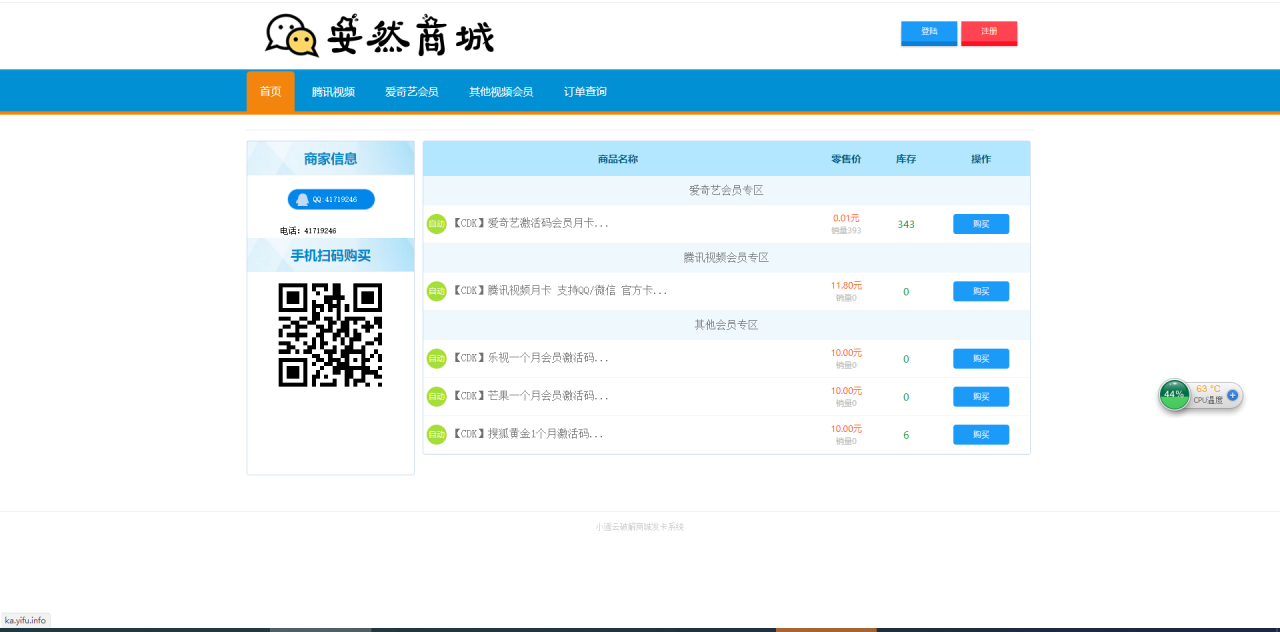
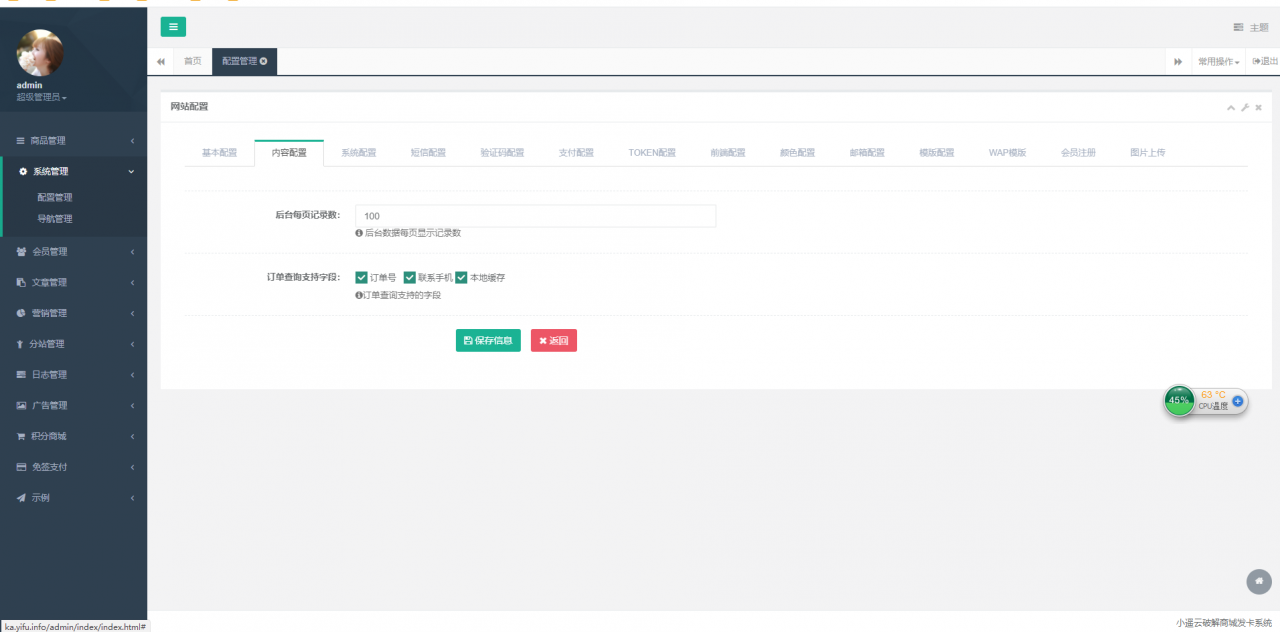
    伯乐发卡网用过的都知道很不错的

    不过自从码支付倒闭之后  伯乐发卡就不能对接第三方支付了

    现在复活了 需要的来下载吧

    说一下  源码下载如果360报毒的话 是因为压缩包里面有个APP

    那个APP是伯乐自带的免签的(用过的都知道)  介意直接删除即可

  • 伯乐发卡网对接码支付复活版

    伯乐发卡网用过的都知道很不错的

    不过自从码支付倒闭之后  伯乐发卡就不能对接第三方支付了

    现在复活了 需要的来下载吧

    说一下  源码下载如果360报毒的话 是因为压缩包里面有个APP

    那个APP是伯乐自带的免签的(用过的都知道)  介意直接删除即可

  • 新版【士兵扫雷UI改版】12月未新增多页面新UI士兵扫雷游戏源码

    环境:Nginx1.14,MYSQL5.5,PHP5.6

    首先上传源码至根目录,修改数据库文件

    /data/conf/database.php

    /simplewind/GatewayWorker/Applications/YourApp/Config/Db.php

    改这两处,导入数据库文件,

    修改运行目录为public,伪静态为thinkphp

    启动游戏命令:cd /www/wwwroot/域名/simplewind/GatewayWorker

    php start.php start -d

    后台地址:域名/admin

    账号密码admin123456

    后台修改信息

  • 新版【士兵扫雷UI改版】12月未新增多页面新UI士兵扫雷游戏源码

    环境:Nginx1.14,MYSQL5.5,PHP5.6

    首先上传源码至根目录,修改数据库文件

    /data/conf/database.php

    /simplewind/GatewayWorker/Applications/YourApp/Config/Db.php

    改这两处,导入数据库文件,

    修改运行目录为public,伪静态为thinkphp

    启动游戏命令:cd /www/wwwroot/域名/simplewind/GatewayWorker

    php start.php start -d

    后台地址:域名/admin

    账号密码admin123456

    后台修改信息